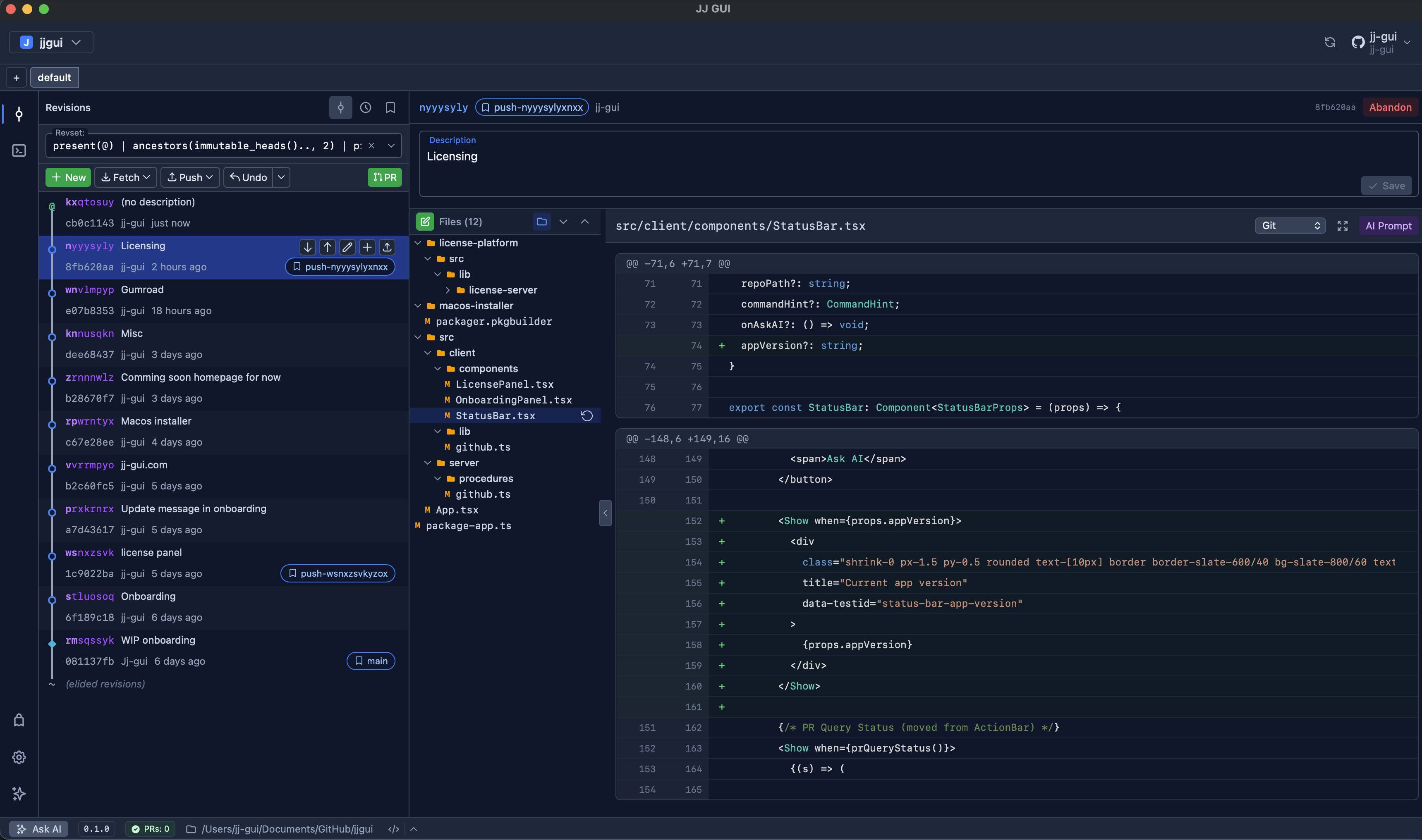
Desktop app for Jujutsu vcs
Version control that finally feels designed.
Using Git? Feel the power of jj (Jujutsu vcs) risk-free with your existing repositories and remotes, you can transparently switch to jj without disrupting your and your team's workflow. Learn jj in the process. See the commands behind your actions, it is not a black box.
Already a jj user? jjgui gives you a fast visual workflow, gives you powerful tools to manage complexity, and surfaces AI help when you need it. All with the same Git-compatible foundations you rely on today.
Prerequisites
Required
gitCLIjjCLIghCLI
Optional (for AI support)
copilotclaude
How to start using jjgui
- Download the app: Download the latest build for your platform.
- Install the app: Complete the installation so
jjguiis available from your system.
macOS
Pick the launch path that fits how you work today.
- To open from the Spotlight Search: Type
jjguiand open the app, then choose the folder you want to open. - To open from the command line: In your terminal, run
jjguito open jjgui in the context of your current path.
Linux
Choose one of the following installation methods:
Option A: Install via APT (Debian/Ubuntu)
Add the jjgui repository for automatic updates via apt:
# Import the signing key
curl -fsSL https://releases.jj-gui.com/gpg-key.asc | sudo gpg --dearmor -o /usr/share/keyrings/jjgui.gpg

# Add the repository
echo "deb [signed-by=/usr/share/keyrings/jjgui.gpg] https://releases.jj-gui.com/apt stable main" \
  | sudo tee /etc/apt/sources.list.d/jjgui.list

# Install
sudo apt update && sudo apt install jjgui
Option B: Install .deb directly
Download the .deb package and install it manually. You can verify the signature before installing:
# Import the signing key (one-time)
curl -fsSL https://releases.jj-gui.com/gpg-key.asc | gpg --import

# Download .deb and signature
curl -LO https://releases.jj-gui.com/jjgui_<version>_<arch>.deb
curl -LO https://releases.jj-gui.com/jjgui_<version>_<arch>.deb.sig

# Verify (optional but recommended)
gpg --verify jjgui_<version>_<arch>.deb.sig jjgui_<version>_<arch>.deb

# Install
sudo dpkg -i jjgui_<version>_<arch>.deb
Option C: Install from tarball
Download the tarball, extract, and copy the binaries:
tar -xzf jjgui-<version>-linux-<arch>.tar.gz
sudo cp jjgui-linux/jjgui-bin /usr/local/bin/
sudo cp jjgui-linux/jjgui /usr/local/bin/
Prerequisite: Linux builds require libwebkit2gtk-4.1. Install it with:
sudo apt install libwebkit2gtk-4.1-0Once installed, run jjgui from your terminal inside any jj repository directory.
AI that works inside your version-control flow
Use AI where decisions happen, not in a disconnected chat tab.
Having trouble with a rebase? Ask AI to suggest the next step right in the middle of conflict resolution.
AI-assisted code review
Review AI-generated code in a familiar GitHub-style review flow, then ask AI to apply follow-up changes directly from that review context.
Found something to fix during code review? Start an AI thread beside the relevant code and diffs, without switching back to your IDE or a separate chat app, just type /review-comments in the AI panel, or generate the prompt for you to copy.
Parallel workflows, made easy
As AI accelerates code generation, teams need better ways to run tasks in parallel. jjgui makes it easy to create multiple workspaces, update your codebase in parallel, and start dedicated AI threads per workspace directly from the interface.
Claude integration
Repository-aware prompts and command execution support right beside your graph and diffs.
GitHub Copilot support
Leverage Copilot from inside jjgui using familiar account and session workflows.
AI code review loop
Review AI-generated changes like a GitHub code review, then ask AI to revise and apply updates without leaving jjgui.
GitHub integration built in
jjgui Github integration is powered by the gh CLI. You can use it to open PRs, inspect status checks, and switch between multiple GitHub accounts through gh integration without leaving jjgui.
PR creationStatus checksMulti-account supportTemplate friendly
Simple licensing for individuals and teams
Download the app and choose the model that matches how you adopt jjgui.
30 days free
Full product access with no upfront payment.
- All core jjgui features enabled.
- Great for evaluating workflow fit with your repos.
- Paid entitlement required after trial period ends.
$60 one-time
Own the purchased major version permanently.
- When you purchase Perpetual license, you can use the current major version (e.g v1.x) forever. You will get free (minor and patch) updates for that major version.
- No recurring billing.
- Upgrade later when your team is ready.
$60 one-time + $30/year
Add on top of the perpetual license for continuous updates with long-term flexibility.
- All updates while the maintenance plan is active.
- Cancel anytime; benefits continue through current term.
- Perpetual entitlement remains at reached major version.
Community & Support
jjgui is closed-source software, but we believe in open communication. We have a public GitHub repository for issue tracking and community discussions.
Report an Issue
Found a bug or have a feature request? File an issue and help us improve jjgui.
Open an IssueJoin the Discussion
Have a question, idea, or want to share how you use jjgui? Start or join a discussion.
Start a DiscussionShip cleaner history with less friction.
Download jjgui and make version-control operations understandable at a glance.